
%20copy.png)

Wireless Presentation System
Wireless collaboration solution for enterprise and education
WPS-E-1080

4K Wireless Presentation System with USB C Dongle
BYOM | MIRACAST | AIRPLAY

LatenTech AV WPS-E-1080
Wireless Presentation System
Seamless Collaboration, Instant Connectivity
Experience effortless screen sharing and team collaboration with the LatenTech WPS-E-1080 Wireless Presentation System. Designed for modern meeting rooms, classrooms, and conference spaces, this device allows you to wirelessly present content from laptops, tablets, or smartphones with zero cables and minimal setup.
Why Choose WPS-E-1080 Wireless Presentation System?
-
✅ True Plug-and-Play: Connect instantly without installing software or drivers.
-
✅ 4K Ultra HD Output: Deliver stunning visuals with crisp detail and clarity.
-
✅ Multi-Device Support: Compatible with Windows, macOS, Android, and iOS.
-
✅ Dual Screen Sharing: Present from two devices at the same time—ideal for comparison or collaboration.
-
✅ Enterprise-Grade Security: Built-in encryption ensures secure data transmission.
-
✅ Touchback Support: Control your laptop directly from the interactive display.
Transform Any Room into a Smart Wireless Meeting Room
Whether you're upgrading a boardroom or setting up a collaborative classroom, the WPS-E-1080 Wireless Presentation System is the perfect tool for interactive, wireless screen sharing. Enhance productivity, reduce clutter, and make meetings more engaging.
Boost Your Meetings
with
LatenTech’s Wireless Presentation System
The WPS-E-1080 is more than a device—it’s a smart investment in team efficiency. Upgrade today and see the difference a professional wireless presentation system can make.


BYOM support
Connect any Room camera wirelessly
In today’s workplaces, many people tend to bring their own device to the office. As a natural extension of BYOD, BYOM allows you to connect wirelessly to the meeting room screen with your own device, and start the video conference using your preferred UC platform (Microsoft Teams, Zoom, Webex).


Automatic Meeting Flow Boosts Productivity
Avoid spending time to set up hybrid meetings with your unfamiliar AV equipment, simply walk into the meeting room and connect wirelessly to the existing facilities, without pausing your ongoing video call. No cables, no mess.
Remote Collaboration Never Been Easier
Designed with BYOM in mind, WPS-E-1080 brings intuitive collaboration experience to your hybrid meeting by allowing remote participants to share their personal screen or view content shared on the room display with no requirement of the same LAN.


WPS-E-1080 Operating System Eshare
LatenTech AV WPS-E-1080: A Seamless BYOM Solution Powered by EShare
The LatenTech AV WPS-E-1080 is a next-generation BYOM (Bring Your Own Meeting) solution designed to enhance wireless collaboration in modern meeting rooms, classrooms, and corporate environments. Powered by EShare, this powerful wireless presentation system offers effortless screen sharing, cross-platform compatibility, and rich collaboration features to create a truly interactive and connected experience.


Why Choose the LatenTech AV WPS-E-1080?
-
True BYOM Experience: The WPS-E-1080 enables users to launch and control video conferencing platforms like Zoom, Teams, or Google Meet using their own devices, connecting seamlessly to room cameras, microphones, and speakers.
-
Plug-and-Play Hardware: With optional accessories like the EShare Wireless Presentation Button, users can enjoy one-touch screen sharing with 4K resolution.
-
Remote Management: IT teams can monitor and control devices remotely, ensuring centralized control and simplified troubleshooting.
-
Enterprise-Grade Security: Built-in WPA2 encryption and secure user authentication protect sensitive data during every session.
The LatenTech AV WPS-E-1080, Powered by EShare, is more than just a wireless presentation system—it’s a complete, scalable BYOM solution for forward-thinking organizations. With robust screen sharing, collaboration, and control features, it redefines how teams connect, communicate, and collaborate across any space.

USB C DONGLE
As a Click-to-Share button for wireless presentation, WPS-E-1080 Button realizes screen mirroing of your personal device to the meeting room’s WPS-E-1080 Touch with extended BYOM feature.
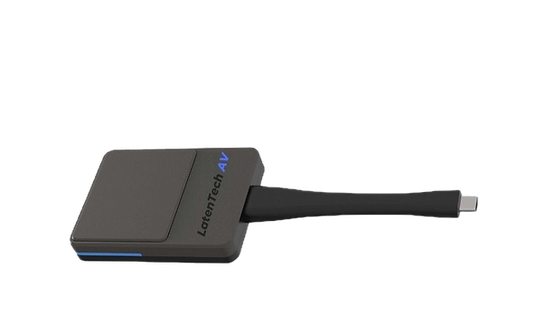

Requiring No Network and Installation
For guests who don’t have access to the company network, they can share personal mobile devices wirelessly through WPS-E-1080 Button. There is no requirement for network and software installations. The user-friendly design with one-click to share brings you a hassle-free experience.


One Click to Share Wirelessly
Cable-free | Two-way touch control
For guests who don’t have access to the company network, they can share personal mobile devices wirelessly through WPS-E-1080 Button. There is no requirement for network and software installations. The user-friendly design with one-click to share brings you a hassle-free experience.


