
%20copy.png)

Wireless Presentation System
Wireless collaboration solution for enterprise and education
WPS-E-1080

4K Wireless Presentation System with USB C Dongle
BYOM | MIRACAST | AIRPLAY

LatenTech AV WPS-E-1080
無線演示系統
無縫協作,即時連接
LatenTech WPS-E-1080 無線演示系統讓您輕鬆實現螢幕分享和團隊協作。這款設備專為現代會議室、教室和會議場所設計,支援從筆記型電腦、平板電腦或智慧型手機無線展示內容,無需任何線纜,設定也極為簡便。
為什麼選擇WPS-E-1080無線展示系統?
✅ 真正的即插即用:無需安裝軟體或驅動程式即可立即連接。
✅ 4K 超高清輸出:呈現清晰銳利、細節豐富的驚艷視覺效果。
✅ 多裝置支援:相容於 Windows、macOS、Android 和 iOS。
✅ 雙螢幕共用:同時從兩個裝置進行示範-非常適合比較或協作。
✅ 企業級安全:內建加密確保資料傳輸安全。
✅ 觸控回饋支援:直接透過互動式顯示器控制筆記型電腦。
將任何房間變成智慧無線會議室
無論您是升級會議室還是建立協作式教室,WPS-E-1080 無線演示系統都是實現互動式無線螢幕共享的理想工具。它能提高工作效率,減少雜亂,讓會議更具吸引力。
提升您的會議效率
和
LatenTech的無線展示系統
WPS-E-1080 不只是一台設備,更是提升團隊效率的明智投資。立即升級,體驗專業無線演示系統帶來的顯著提升。


BYOM support
Connect any Room camera wirelessly
In today’s workplaces, many people tend to bring their own device to the office. As a natural extension of BYOD, BYOM allows you to connect wirelessly to the meeting room screen with your own device, and start the video conference using your preferred UC platform (Microsoft Teams, Zoom, Webex).


Automatic Meeting Flow Boosts Productivity
Avoid spending time to set up hybrid meetings with your unfamiliar AV equipment, simply walk into the meeting room and connect wirelessly to the existing facilities, without pausing your ongoing video call. No cables, no mess.
Remote Collaboration Never Been Easier
Designed with BYOM in mind, WPS-E-1080 brings intuitive collaboration experience to your hybrid meeting by allowing remote participants to share their personal screen or view content shared on the room display with no requirement of the same LAN.


WPS-E-1080 Operating System Eshare
LatenTech AV WPS-E-1080: A Seamless BYOM Solution Powered by EShare
The LatenTech AV WPS-E-1080 is a next-generation BYOM (Bring Your Own Meeting) solution designed to enhance wireless collaboration in modern meeting rooms, classrooms, and corporate environments. Powered by EShare, this powerful wireless presentation system offers effortless screen sharing, cross-platform compatibility, and rich collaboration features to create a truly interactive and connected experience.


Why Choose the LatenTech AV WPS-E-1080?
-
True BYOM Experience: The WPS-E-1080 enables users to launch and control video conferencing platforms like Zoom, Teams, or Google Meet using their own devices, connecting seamlessly to room cameras, microphones, and speakers.
-
Plug-and-Play Hardware: With optional accessories like the EShare Wireless Presentation Button, users can enjoy one-touch screen sharing with 4K resolution.
-
Remote Management: IT teams can monitor and control devices remotely, ensuring centralized control and simplified troubleshooting.
-
Enterprise-Grade Security: Built-in WPA2 encryption and secure user authentication protect sensitive data during every session.
The LatenTech AV WPS-E-1080, Powered by EShare, is more than just a wireless presentation system—it’s a complete, scalable BYOM solution for forward-thinking organizations. With robust screen sharing, collaboration, and control features, it redefines how teams connect, communicate, and collaborate across any space.

USB C DONGLE
As a Click-to-Share button for wireless presentation, WPS-E-1080 Button realizes screen mirroing of your personal device to the meeting room’s WPS-E-1080 Touch with extended BYOM feature.
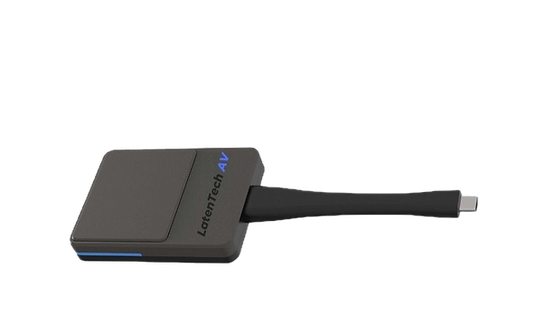

Requiring No Network and Installation
For guests who don’t have access to the company network, they can share personal mobile devices wirelessly through WPS-E-1080 Button. There is no requirement for network and software installations. The user-friendly design with one-click to share brings you a hassle-free experience.


One Click to Share Wirelessly
Cable-free | Two-way touch control
For guests who don’t have access to the company network, they can share personal mobile devices wirelessly through WPS-E-1080 Button. There is no requirement for network and software installations. The user-friendly design with one-click to share brings you a hassle-free experience.


