
%20copy.png)
مصنع أصلي للمعدات الأصلية ومصنع تصميم وتصنيع المعدات الأصلية
صُمم وهُندس في
هونغ كونغ
اختر بلدك أو منطقتك

Wireless Presentation System
Wireless collaboration solution for enterprise and education
WPS-E-1080

4K Wireless Presentation System with USB C Dongle
BYOM | MIRACAST | AIRPLAY

LatenTech AV WPS-E-1080
نظام العرض اللاسلكي
تعاون سلس، اتصال فوري
استمتع بتجربة مشاركة الشاشة والتعاون الجماعي السلس مع نظام العرض اللاسلكي LatenTech WPS-E-1080. صُمم هذا الجهاز خصيصًا لغرف الاجتماعات الحديثة، والفصول الدراسية، وقاعات المؤتمرات، حيث يتيح لك عرض المحتوى لاسلكيًا من أجهزة الكمبيوتر المحمولة، أو الأجهزة اللوحية، أو الهواتف الذكية بدون أسلاك وبأقل قدر من الإعدادات.
لماذا تختار نظام العرض اللاسلكي WPS-E-1080؟
✅ التوصيل والتشغيل الحقيقي: اتصل على الفور دون تثبيت برامج أو تعريفات.
✅ مخرج فائق الوضوح بدقة 4K: يقدم صورًا مذهلة بتفاصيل ووضوح فائقين.
✅ دعم متعدد الأجهزة: متوافق مع أنظمة التشغيل Windows و macOS و Android و iOS.
✅ مشاركة الشاشة المزدوجة: العرض من جهازين في نفس الوقت - مثالي للمقارنة أو التعاون.
✅ أمان على مستوى المؤسسات: يضمن التشفير المدمج نقل البيانات بشكل آمن.
✅ دعم اللمس الخلفي: تحكم في جهاز الكمبيوتر المحمول الخاص بك مباشرة من الشاشة التفاعلية.
حوّل أي غرفة إلى غرفة اجتماعات لاسلكية ذكية
سواء كنت تُحدّث قاعة اجتماعات أو تُجهّز فصلاً دراسياً تفاعلياً، فإن نظام العرض اللاسلكي WPS-E-1080 هو الأداة المثالية لمشاركة الشاشة لاسلكياً وبشكل تفاعلي. عزّز الإنتاجية، وقلّل الفوضى، واجعل الاجتماعات أكثر جاذبية.
عزز اجتماعاتك
مع
نظام العرض اللاسلكي من شركة لاتين تيك
جهاز WPS-E-1080 ليس مجرد جهاز، بل هو استثمار ذكي في كفاءة الفريق. حسّن نظامك اليوم ولاحظ الفرق الذي يُحدثه نظام العرض اللاسلكي الاحترافي.


BYOM support
Connect any Room camera wirelessly
In today’s workplaces, many people tend to bring their own device to the office. As a natural extension of BYOD, BYOM allows you to connect wirelessly to the meeting room screen with your own device, and start the video conference using your preferred UC platform (Microsoft Teams, Zoom, Webex).


Automatic Meeting Flow Boosts Productivity
Avoid spending time to set up hybrid meetings with your unfamiliar AV equipment, simply walk into the meeting room and connect wirelessly to the existing facilities, without pausing your ongoing video call. No cables, no mess.
Remote Collaboration Never Been Easier
Designed with BYOM in mind, WPS-E-1080 brings intuitive collaboration experience to your hybrid meeting by allowing remote participants to share their personal screen or view content shared on the room display with no requirement of the same LAN.


WPS-E-1080 Operating System Eshare
LatenTech AV WPS-E-1080: A Seamless BYOM Solution Powered by EShare
The LatenTech AV WPS-E-1080 is a next-generation BYOM (Bring Your Own Meeting) solution designed to enhance wireless collaboration in modern meeting rooms, classrooms, and corporate environments. Powered by EShare, this powerful wireless presentation system offers effortless screen sharing, cross-platform compatibility, and rich collaboration features to create a truly interactive and connected experience.


Why Choose the LatenTech AV WPS-E-1080?
-
True BYOM Experience: The WPS-E-1080 enables users to launch and control video conferencing platforms like Zoom, Teams, or Google Meet using their own devices, connecting seamlessly to room cameras, microphones, and speakers.
-
Plug-and-Play Hardware: With optional accessories like the EShare Wireless Presentation Button, users can enjoy one-touch screen sharing with 4K resolution.
-
Remote Management: IT teams can monitor and control devices remotely, ensuring centralized control and simplified troubleshooting.
-
Enterprise-Grade Security: Built-in WPA2 encryption and secure user authentication protect sensitive data during every session.
The LatenTech AV WPS-E-1080, Powered by EShare, is more than just a wireless presentation system—it’s a complete, scalable BYOM solution for forward-thinking organizations. With robust screen sharing, collaboration, and control features, it redefines how teams connect, communicate, and collaborate across any space.

USB C DONGLE
As a Click-to-Share button for wireless presentation, WPS-E-1080 Button realizes screen mirroing of your personal device to the meeting room’s WPS-E-1080 Touch with extended BYOM feature.
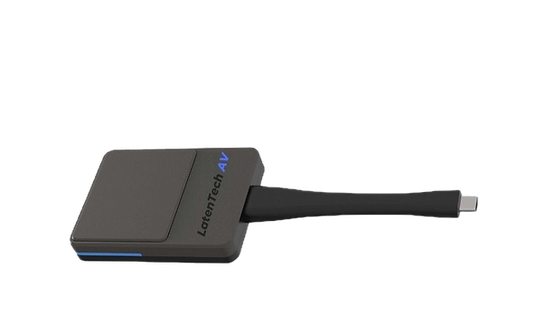

Requiring No Network and Installation
For guests who don’t have access to the company network, they can share personal mobile devices wirelessly through WPS-E-1080 Button. There is no requirement for network and software installations. The user-friendly design with one-click to share brings you a hassle-free experience.


One Click to Share Wirelessly
Cable-free | Two-way touch control
For guests who don’t have access to the company network, they can share personal mobile devices wirelessly through WPS-E-1080 Button. There is no requirement for network and software installations. The user-friendly design with one-click to share brings you a hassle-free experience.


